

Bank file (SEPA)
The bank file pays every employee's net pay in one upload: a SEPA Credit Transfer file (pain.001.001.03, category Salary) that every Irish bank's business banking accepts.
Before you start
- Finalise the period. The bank file is always made from finalised results.
- Each employee paid by bank transfer needs an IBAN on their record. Employees with Paid by: Another way are left out.
Make the file
- On the Payroll page, choose Bank file · Week … (or Bank on a period's row in Reports).
- Check Pay from IBAN (1), the employer's account the wages are paid from. It is filled in from Employer settings. BIC (optional) is worked out from an Irish IBAN.
- Check the line at the top: number of payments, total and pay date.
- Choose Save bank file (2).
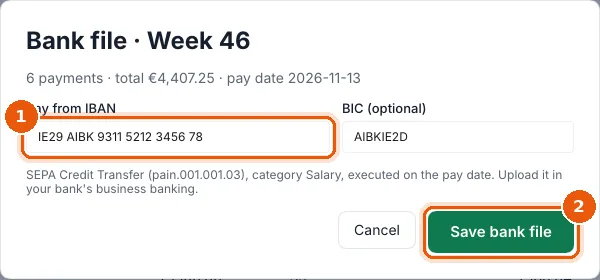
The file is saved as pay date, period SEPA.xml in Documents → Payroll Manager Reports → employer, and the folder opens.
Upload it
Upload the file in your bank's business banking (for example under Payments → Upload payment file or Bulk payments) and approve it there. The payments are dated for the pay date. Payroll Manager never connects to your bank.