

Payroll Manager Desktop
Payroll Manager Desktop runs Irish payroll on your own computer: PAYE, USC, PRSI, pensions and MyFutureFund, payslips, the SEPA bank file and the Revenue payroll submission. A bureau runs every client in one window; a company runs its own payroll. It works on Windows and Linux, and keeps working without an internet connection.
A tour of the window
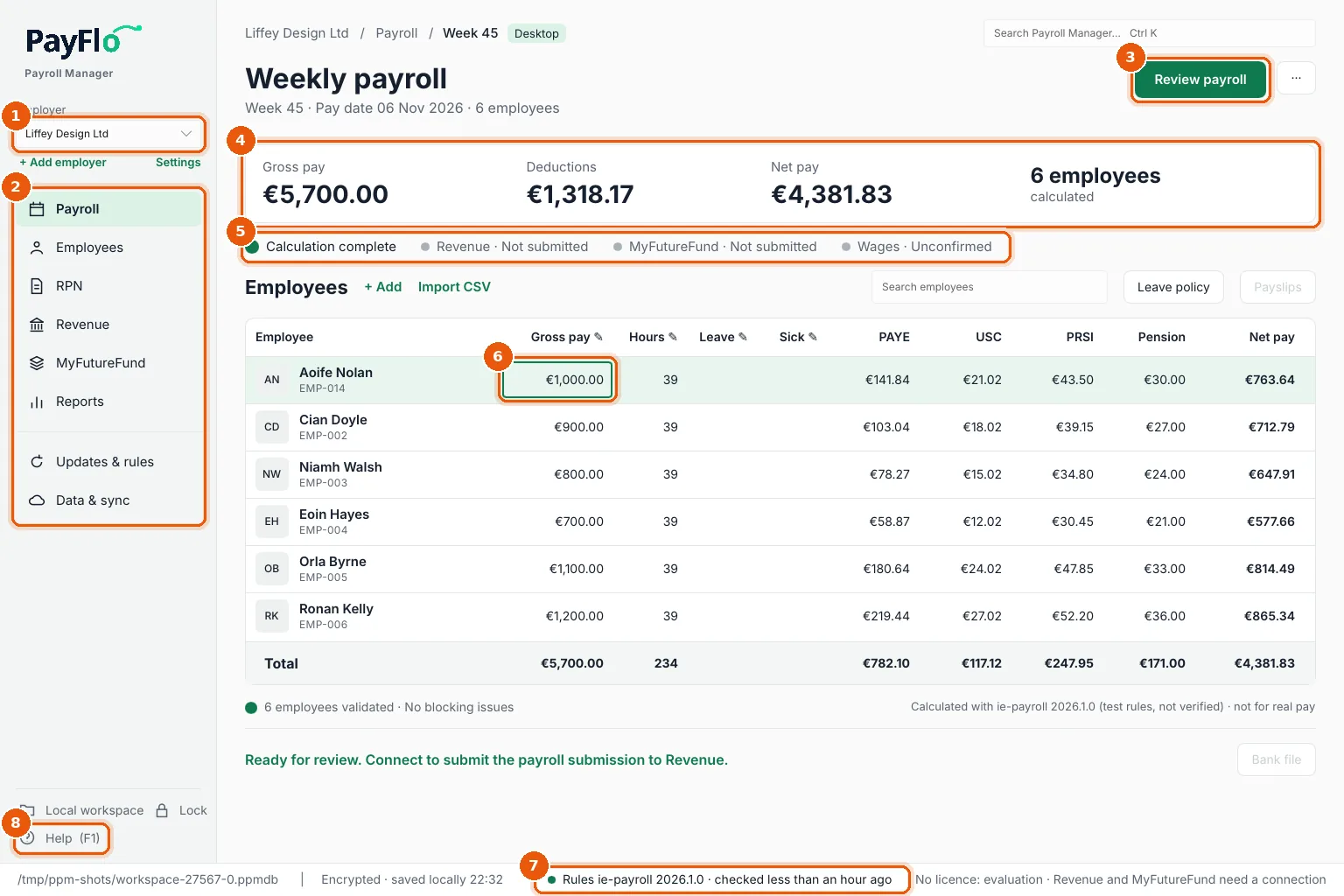
- Employer: the employer (client) you are working on. + Add employer and Settings sit below it.
- Sidebar: Payroll, Employees, RPN, Revenue, MyFutureFund, Reports, then Updates & rules and Data & sync.
- Review payroll: checks the period and opens the review, where you approve and finalise.
- Totals of the current period: gross pay, deductions, net pay and how many employees are calculated.
- Status of the period: calculation, the last finalised period, Revenue, MyFutureFund and wages.
- The payroll grid: one row per employee. Amounts with a pencil in the heading can be typed in; deductions and net pay are always calculated.
- Status bar: where your data is saved, and which tax rules are installed and when they were last checked.
- Help (F1): opens the help page for the screen you are on. F1 works everywhere in the app.
A pay run, step by step
- Import RPNs from ROS so every employee has current tax credits. Import RPNs
- Enter this period's pay: hours, overtime, leave and sick days in the grid. Run the payroll
- Review payroll and, if the employer approves pay runs, record their approval. Review, approve and finalise
- Finalise the period. Results are locked and the next period opens.
- Payslips and the bank file for the period. Payslips, Bank file
- Revenue: prepare the payroll submission file. Revenue
- MyFutureFund: the contribution file, if any employee is enrolled. MyFutureFund
Keyboard
| Keys | What they do |
|---|---|
| F1 | Help for the current screen |
| Arrows, Tab, Home/End, Ctrl+Home/Ctrl+End, Page Up/Page Down | Move in the grid |
| Enter or F2, or start typing a number | Edit a cell; Enter saves, Esc cancels |
| Shift+arrows, Ctrl+A | Select cells |
| Ctrl+C / Ctrl+V | Copy and paste cells to and from Excel or LibreOffice |
| Delete | Set the selected amounts to €0.00 |