

Photograph a timesheet
If your staff fill in a paper timesheet, you can send it to your bureau as a photo. AI reads the names and the hours from the photo and matches the names to your staff. You then check the result and send it. Nothing is used for pay until you do.
Any layout works: a name or an initial and surname, start and finish times, breaks, or just hours per day. Handwriting is fine.
Before you start
- Your bureau has switched on reading timesheets with AI for your company. If not, the app tells you, and you can send hours from a file instead.
- You have the Submit hours permission.
- The pay period is Open.
Take a good photo
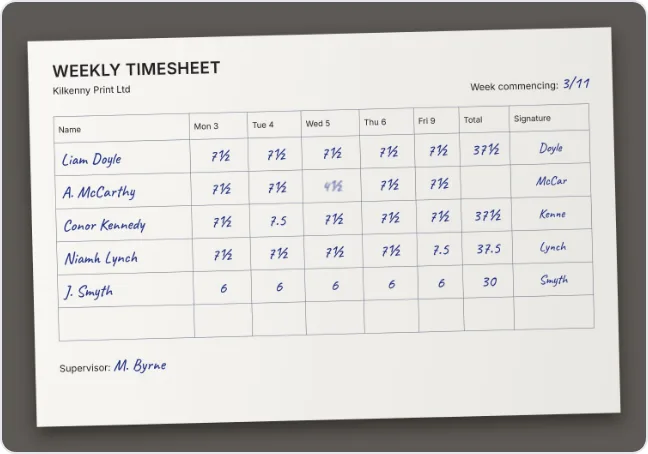
- Whole sheet in the frame, including the names column and all the days.
- Flat and straight: put the sheet on a table, hold the phone above it.
- Good light, no shadow of your phone or hand, no flash glare.
- Sharp: tap the screen to focus, hold still.
- One sheet per photo. For two sheets, send two photos.
- The photo must be a JPEG, PNG or WebP and no larger than 5 MB. A normal phone photo is fine.
Send the photo
On Hours, find the open pay period.
Choose Take a photo. Your phone's camera opens. (On a computer, choose the picture file.)
Take the photo and confirm it (Use Photo or OK, depending on your phone).
Wait while the app says Reading your timesheet. This can take up to 30 seconds. (1). Keep the app open.
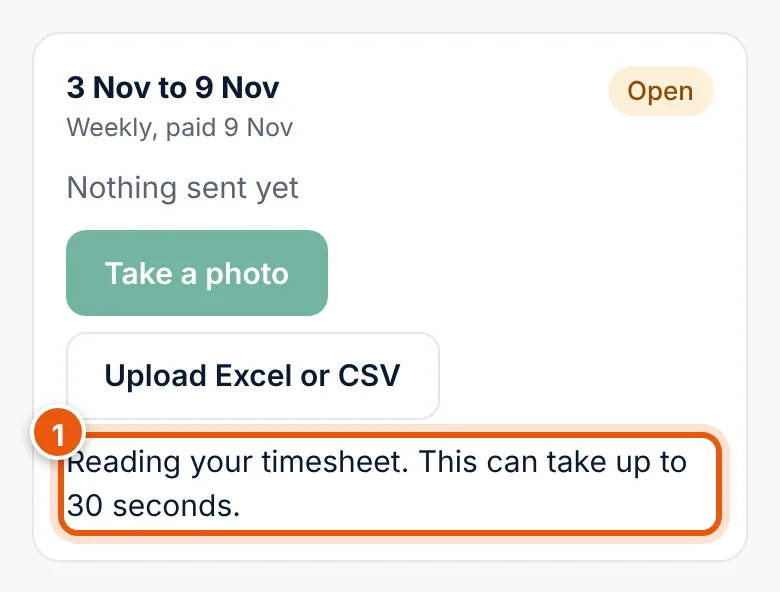
The app reads the photo (1). Check the hours opens below the period. Go on with Check the hours and send them.
If the photo cannot be read
| You see | What to do |
|---|---|
| We couldn't read this photo. Take it again in good light. | Retake it: whole sheet, flat, no shadow. |
| The photo is too large (over 5 MB). Take it again. | Take it again with the normal camera setting, not RAW or the maximum resolution. |
| Use a JPEG, PNG or WebP photo. | Choose a normal photo, not a PDF or HEIC file from another app. |
| Your bureau hasn't turned on reading timesheets with AI. | Upload an Excel or CSV file, or ask your bureau to switch it on. |
| Reading photos isn't available right now. Try again later. | The reading service is busy or down. Try again in a few minutes, or upload a file. |
| This pay period is closed. | Your bureau has closed the period. Ask them if something has to change. |
| Your bureau has no staff on this pay period yet. | Your bureau must add your staff first. Contact them. |
Who sees the photo
You, other people in your company with access to hours, and your bureau. The photo is stored encrypted in the EU and kept with the payroll records for the pay period.